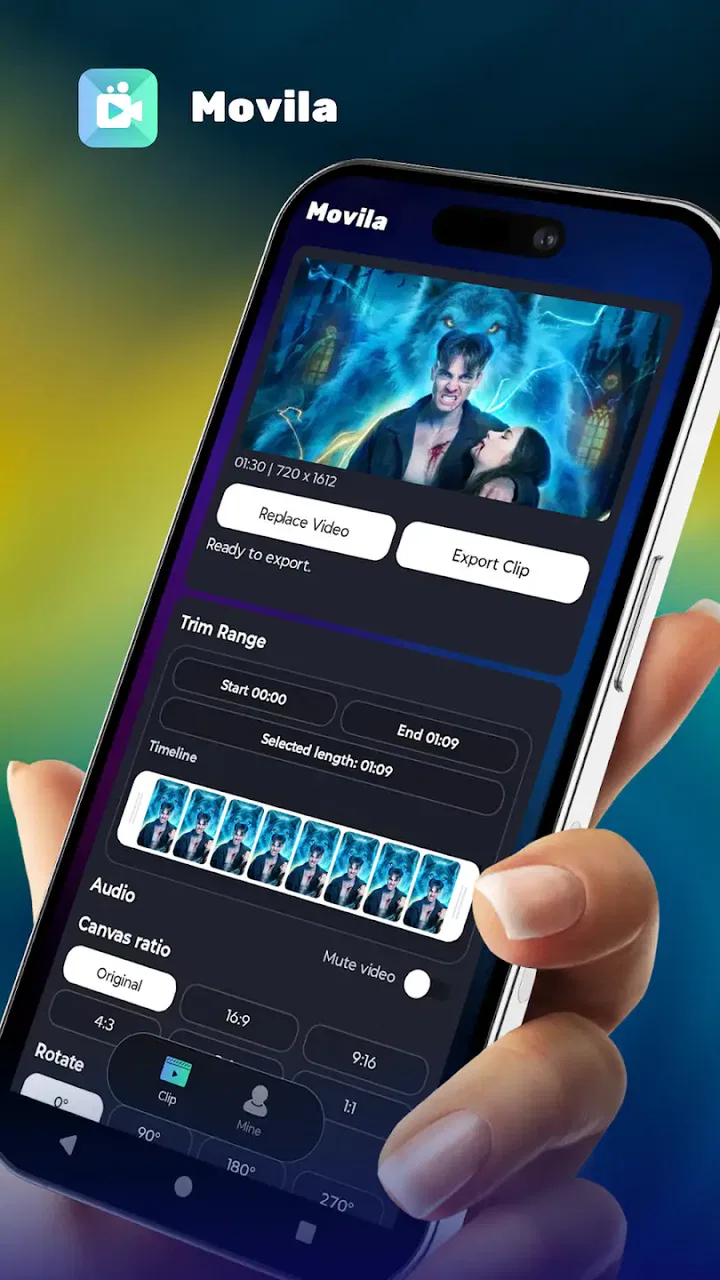
Movila
- 4.4
- Rating
- 10.00K
- Installs
- Free
- Price

 Analysis by App-foxy
I first approached Movila as the kind of Lifestyle app I would open when I had a handful of phone clips and wanted to turn them into something presentable without making video editing a separate project. That is the app’s real appeal: it is aimed at moving from scattered footage to a finished social clip with as little ceremony as possible. I would not treat it as a replacement for a full desktop editor, but I can see why its straightforward purpose has attracted an average rating of 4.4 from around 335 ratings.
The developer, Imajinair, presents Movila as a fast video editor, and that description makes sense in everyday use. The important question is not whether it can compete with every advanced editing suite. It cannot be judged fairly on that basis. The better question is whether it helps someone complete a small video task on a phone, from choosing the raw material to preparing a clip that feels polished enough to share. For that job, the app has a focused identity.
From a messy camera roll to a usable first cut
A realistic starting point is a weekend outing. I might return with a few short videos: a wide view, a close-up of food, a quick reaction from a friend, and a final shot of the place itself. None of those clips is difficult on its own, but posting them separately can feel disjointed. Opening Movila gives me a more useful goal than simply browsing the camera roll: decide what the story is, select only the material that supports it, and shape it into one compact video.
You May Also Like

 AccuWeather: Weather Radar
AccuWeather Review: A Quick, Clear Forecast for Everyday Decisions
For everyday plans, the best forecast is the one you can understand quickly. AccuWeather makes rain timing, radar, and local conditions easy to act on, with a few trade-offs.

 Hill Climb Racing
Why Hill Climb Racing Still Turns Crashes Into One More Run
A tiny car, a bumpy hill and one more upgrade: Hill Climb Racing keeps resurfacing because its simple chaos makes every near-miss feel personal.

 AliExpress - Shopping App
AliExpress Makes Global Shopping Feel Personal, but Shoppers Bear the Risk
AliExpress turns a global marketplace into a pocket-sized discovery engine. Its reach is useful, its shopping loop compelling, and its trade-offs easy to miss.

 Lords Mobile: Kingdom Wars
Lords Mobile Is a Kingdom-Building Routine, Not a Quick Match
A case-by-case verdict on the building, battles, device demands, and social commitments that make Lords Mobile rewarding for some players and exhausting for others.

 PDF Scanner app - TapScanner
TapScanner Makes Paperwork Easier to Capture, Check, and Share
TapScanner makes scanning with a phone feel less like a rescue operation and more like a dependable step in getting work done. Its capture tools are useful, though not flawless.

 Block Blast!
 Shows How Much a Puzzle Game Can Leave Out
A quiet grid game shows why puzzle players increasingly value instant clarity, repeatable skill and low-pressure play—and where the genre still needs to catch up.
More From Our News Desk
View All News


That first decision matters more than any effect. A quick editor can save time only when the source material is already narrowed down. I would begin by choosing clips with a clear role rather than importing everything. The opening should establish context, the middle should show the most interesting moment, and the ending should provide a natural stop. This approach reduces the temptation to compensate for weak footage with transitions or decoration.
Movila is especially suitable for people who think in terms of finished moments instead of timelines. If you want to document a small event, package a few product shots for a social post, or turn a family outing into a short memory, the app’s compact purpose is helpful. It encourages a decision that many larger editors make surprisingly difficult: stop adding material once the central idea is clear.
There is also a practical handoff at this stage. The camera roll is where the footage lives, but the editor is where the footage becomes a sequence. I would keep the original clips untouched and work from a deliberately selected group. That makes it easier to change direction if the first arrangement feels flat. It also prevents a common mobile-editing mistake: repeatedly reopening the entire library and losing track of which shots were meant to be used.
Building the sequence without overworking it
Once the clips are selected, I would watch them in the order they appear rather than assuming the capture order is the right order. A phone often records moments opportunistically, not narratively. Movila’s value here is less about turning me into an editor and more about giving me a direct path toward a coherent clip. I can judge the rhythm by asking whether each shot adds information, emotion, or movement.
For a short social video, the strongest arrangement is often not the most complete one. A long establishing shot may be useful at the beginning, but keeping every second can make the final result feel slow. A reaction shot may be technically shaky yet still deserve a place because it gives the sequence personality. I would make those choices before spending time on finishing touches.
One useful workflow is to create a rough version first and watch it from beginning to end before polishing anything. If the sequence does not make sense in its plain form, visual adjustments will not solve the underlying problem. This is a small but important advantage of using a focused mobile editor: the process invites a quick test rather than a long session of speculative tweaking.
I also recommend treating the first and last clips as handoff points. The opening hands the viewer into the event, while the ending hands the viewer back to the feed or the next activity. Abrupt starts and stops are often more noticeable than imperfect middle sections. A short pause, a cleaner final image, or a more deliberate closing moment can make the entire video feel more considered.
That is where Movila can be more approachable than a traditional desktop workflow. A desktop editor gives finer control, but it also makes every choice look important. On a phone, the practical target is usually a shareable result rather than a master project. I would choose Movila when speed and clarity matter more than a deep collection of specialist controls.
Making the handoff from edit to share
The finished clip is not really finished when the sequence looks good on the editing screen. It still has to survive the move into the place where it will be watched. This is the part many quick reviews overlook. A video that looks balanced while I am holding the phone can feel poorly framed once it appears in a social feed, a message thread, or a larger display.
I would therefore review the complete result as a viewer, not as the person who assembled it. Does the opening make sense without an explanation? Is the most important moment visible quickly? Does the ending feel intentional, or does it simply stop because the source clip ended? These checks are more valuable than adding another visual flourish.
For a small business owner, the handoff might begin with a few phone shots of a new item and end with a clip ready for a daily social update. The useful discipline is to keep the message narrow: show the item, demonstrate one detail, and close with a clear view. Movila fits that workflow better than an editor designed around elaborate campaigns, provided the goal is one concise piece rather than a complete branded production.
For a parent, the handoff may be from a busy camera roll to a private family message. In that situation, speed is not just convenience. It means the video is more likely to be completed while the memory is still fresh. I would still check every selected clip carefully before sharing, especially when several people appear in the footage. A fast editor shortens the creative process, but it does not replace human judgement about what belongs in the final cut.
For someone preparing travel content, the app can help turn several disconnected scenes into a simple visual diary. The trade-off is that a travel story often benefits from more precise pacing, text treatment, sound decisions, and format control than a quick editor may be intended to provide. I would use Movila for a spontaneous update or a short recap, then move to a more feature-heavy alternative if the project needs a carefully managed sequence.
Where the result feels strongest
The strongest result comes when the input is already reasonably good and the desired outcome is modest. Movila is not asking me to rescue hours of badly exposed footage or construct a long-form narrative. It is most convincing when I have a clear subject, a limited number of clips, and a reason to finish quickly. In that setting, the app’s focused nature becomes a benefit rather than a restriction.
I also like the way this kind of workflow encourages editing for the viewer’s attention. Instead of treating every recorded second as valuable, I can ask what the viewer needs to understand the moment. That usually leads to a shorter, more confident video. A clip does not feel polished because it contains more material; it feels polished because the material has a purpose.
Another practical insight is to separate selection from decoration. I would make the story work with the basic arrangement first, then apply only the finishing choices that support it. This prevents the common trap of using effects to hide uncertainty about the sequence. If the result already communicates the moment, restraint is often the better finish.
The app’s audience size also suggests that it is still a relatively compact product rather than a universally established editing standard. It has over 10 thousand installs, which is enough to show genuine interest but not a reason to assume that every unusual workflow has been solved. I would see that as a prompt to keep expectations realistic: Movila is worth trying for its direct approach, while demanding editors should compare it with tools built around deeper control.
Its current version is 1.0.5, and that detail matters when considering the product’s maturity. A focused app can feel pleasantly uncluttered, but a newer editing tool may still be developing the edge cases that experienced creators notice first. I would keep a copy of important original footage and avoid making the app the only place where a valuable project exists. That is sensible practice for any mobile editor, especially when the final video matters.
Where the workflow breaks down
The first breaking point is ambitious editing. If I need layered storytelling, detailed audio work, precise keyframes, complex titles, or a carefully repeatable production template, I would choose a more advanced alternative. Movila’s appeal comes from reducing friction, and the same reduction can feel limiting when the project demands control at every stage.
The second is poor source material. No quick editor can reliably turn a collection of dark, shaky, badly framed clips into professional footage. Movila may help organize the material into something easier to watch, but it cannot replace better recording habits. I would capture a few stable seconds before and after the main action, keep the subject visible, and avoid filling the project with near-duplicate shots.
A third issue is the difference between a personal clip and a production asset. If a video must match an established visual identity across many posts, I would want dependable repeatability in fonts, colors, layouts, and export choices. A lightweight mobile workflow is attractive for one-off content, but consistency across a large library is usually where a more structured editor earns its place.
There is also a human limitation: fast editing can encourage rushed decisions. Because the route from footage to output is short, I might be tempted to share the first acceptable version. My workaround would be to watch the result once with the sound off and once without looking at the screen continuously. The first test reveals visual confusion; the second reveals whether the pacing works without relying on constant attention.
Who should install it and who should look elsewhere
I would recommend Movila to a casual creator who wants a practical way to assemble short videos from phone footage. It makes sense for social updates, personal recaps, simple demonstrations, and everyday moments that would otherwise remain scattered in the camera roll. The fact that it is free makes experimentation easy, and its Everyone content rating keeps the app approachable for a broad audience.
I would also consider it for someone who dislikes the learning curve of large editing apps. Many alternatives offer more, but more can mean more menus, more setup, and more time spent deciding how to begin. Movila is a better fit when the main obstacle is finishing a small video rather than mastering a complete editing system.
I would skip it for a filmmaker, a creator managing a detailed publishing pipeline, or anyone who needs exact control over every visual and audio layer. Those users should start with an editor whose depth matches the project. Choosing a simpler tool for a complex production can create more work later, particularly when the video needs revisions or consistent treatment across multiple versions.
Device compatibility is another practical consideration. Movila requires Android 8.1 or later, so I would check the phone before planning a workflow around it. On a compatible device, the app is best understood as a quick creative workspace, not a permanent archive. I would keep source clips organized elsewhere and treat the exported video as the shareable outcome.
My final take after following the complete workflow
Movila succeeds when the journey matters more than the toolbox: choose a few clips, arrange them around one idea, review the handoff to the viewer, and finish before the task becomes a chore. I appreciate that its purpose is easy to understand. It does not require me to approach a small social video like a major production, and that can be exactly what makes an everyday project happen.
My honest recommendation is to try it with a deliberately small project first. Use a few clips from one event, make the beginning and ending intentional, and judge the result as someone who did not record the footage. That test will quickly show whether its streamlined workflow matches your habits. If it does, the app can become a useful shortcut from camera roll to finished clip.
I would not call it the universal answer for mobile video editing. Its strengths are speed, approachability, and a clear route to a polished-enough result; its weaknesses appear when a project needs deep control, repeatable production standards, or serious recovery of poor footage. For the right user, though, those boundaries are fair. Movila is at its best when it helps you complete the video you actually need, rather than inviting you to build a much larger project than the moment deserves.
FAQs for Movila
01What is Movila and what are its main features?
Movila is a versatile video streaming app designed to provide users with access to a wide range of films, series, and documentaries. Key features include personalized recommendations, offline viewing capabilities, high-definition streaming, and a user-friendly interface. It supports multiple languages and offers parental controls, making it suitable for all age groups.
02Is Movila available on both Android and iOS platforms?
Yes, Movila is available for download on both Android and iOS platforms. You can find it on the Google Play Store for Android devices and the Apple App Store for iOS devices. Ensure your device meets the compatibility requirements for a seamless experience.
03Does Movila offer a free trial or subscription plans?
Movila offers a 7-day free trial for new users to explore its features and content library. After the trial period, users can choose from various subscription plans, including monthly and annual options, to continue enjoying unlimited access to its extensive collection of media content.
04What type of content can I expect to find on Movila?
Movila hosts a diverse library of content, including blockbuster movies, popular TV series, indie films, and documentaries. The app frequently updates its catalog to include the latest releases and trending shows. Users can explore different genres, such as action, drama, comedy, and more, catering to all preferences.
05How does Movila ensure the security and privacy of its users?
Movila prioritizes user privacy and security by employing robust encryption methods to protect user data. The app adheres to strict privacy policies and does not share personal information with third parties without consent. Additionally, users can manage their privacy settings within the app to enhance their security.
Pros
- User-friendly interface for easy navigation.
- Wide range of customization options.
- Seamless integration with other apps.
- Regular updates with new features.
- Efficient performance with minimal lag.
Cons
- Limited offline functionality.
- Occasional ads can be intrusive.
- High battery consumption in use.
- Some features require in-app purchases.
- Initial setup can be time-consuming.

Movila
Gallery